
Last updated: September 2026
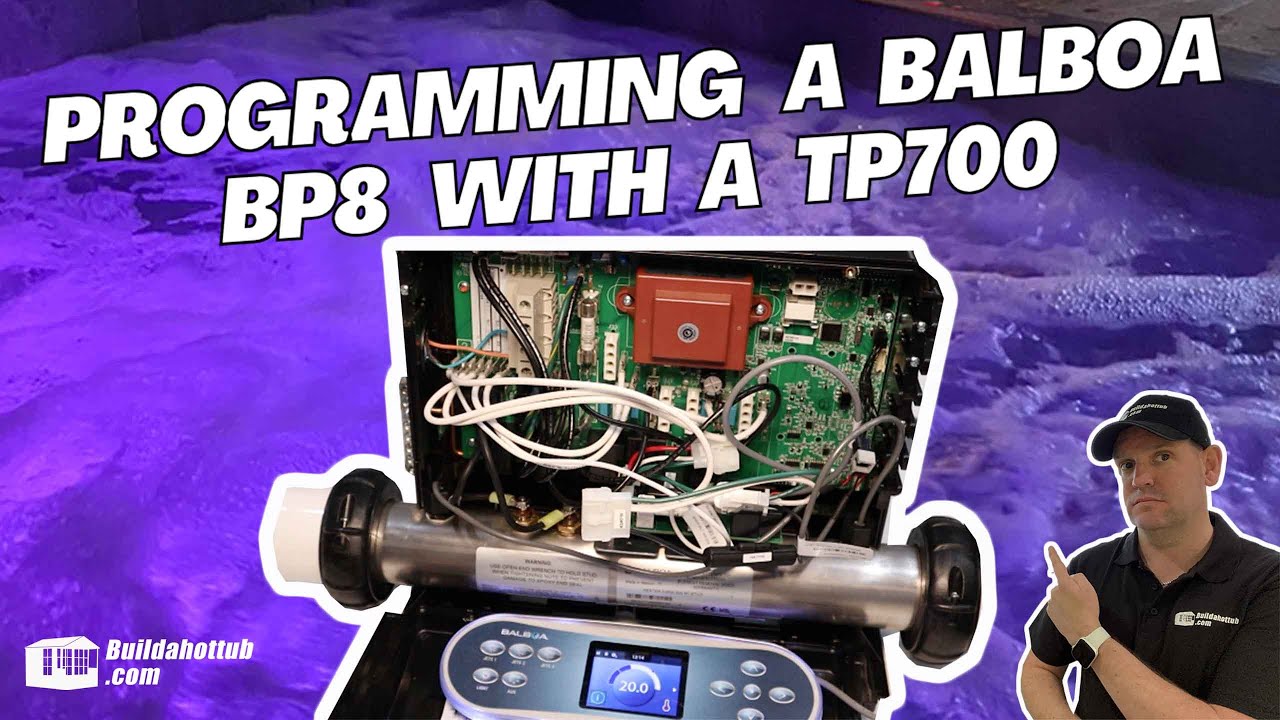
In this guide I’ll walk you through programming the Balboa BP8 spa pack using the TP700 topside control, which has a graphical interface. It’s slightly different from the traditional TP600, so it’s worth following along.
The short version
- The BP8 offers 18 setup modes, listed in the table on the cover. Pick the one that matches your pumps and blower.
- Flip dip switch 1 ON to reveal the Test menu on a TP700 (or spaTouch).
- Choose the mode and press Set. The relays click and the pack restarts.
- Flip dip switch 1 back OFF afterwards, and check the Test menu has gone.
- Safety: the unit is live while you do this, so touch only the switch and keep the lid clear of water.
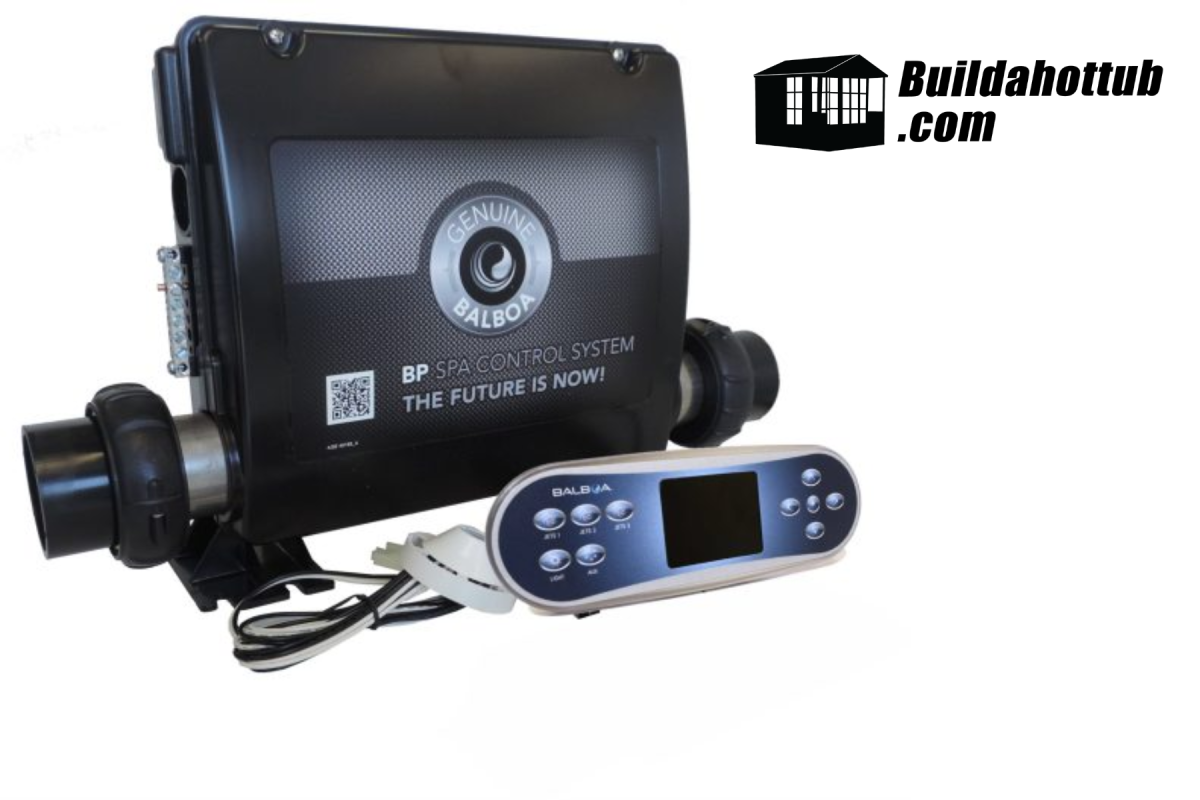
Overview of the Balboa BP8 spa pack
Looking to buy one? You can get the BP8 here. I’ve reviewed it in my Balboa BP8 review.
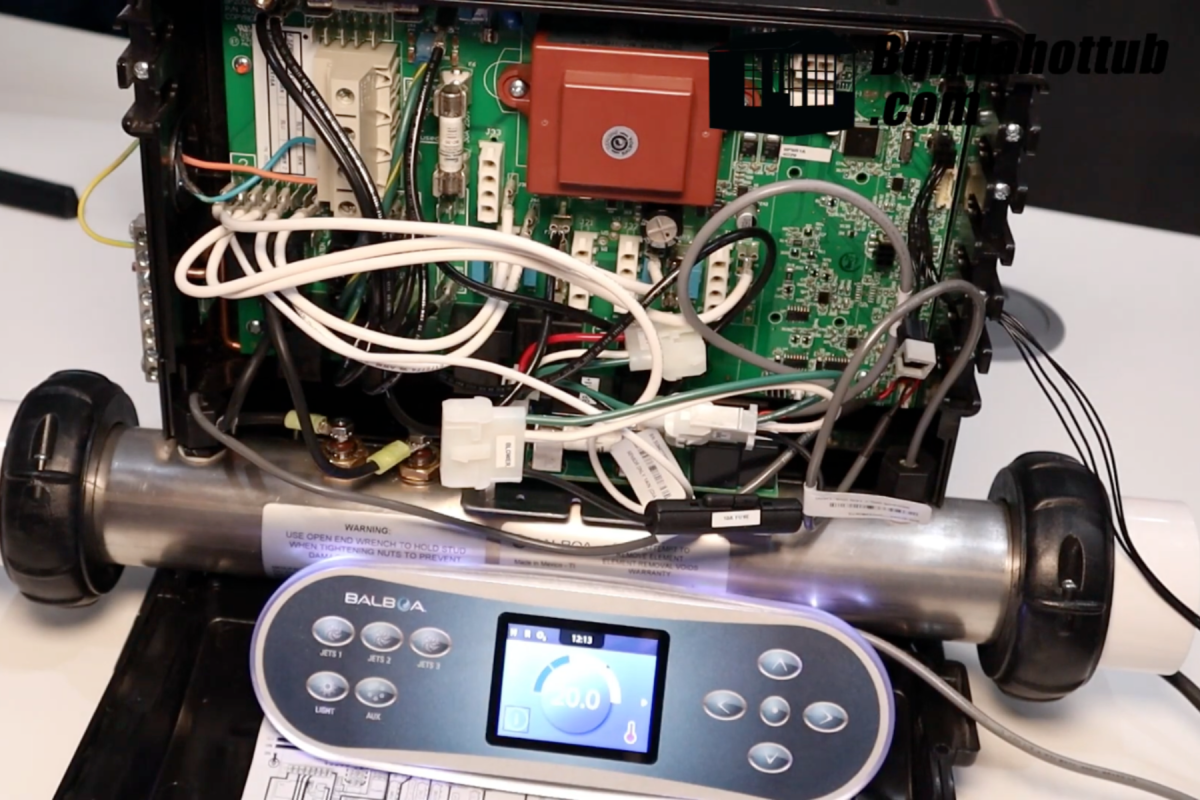
Here’s the Balboa BP8 spa pack:
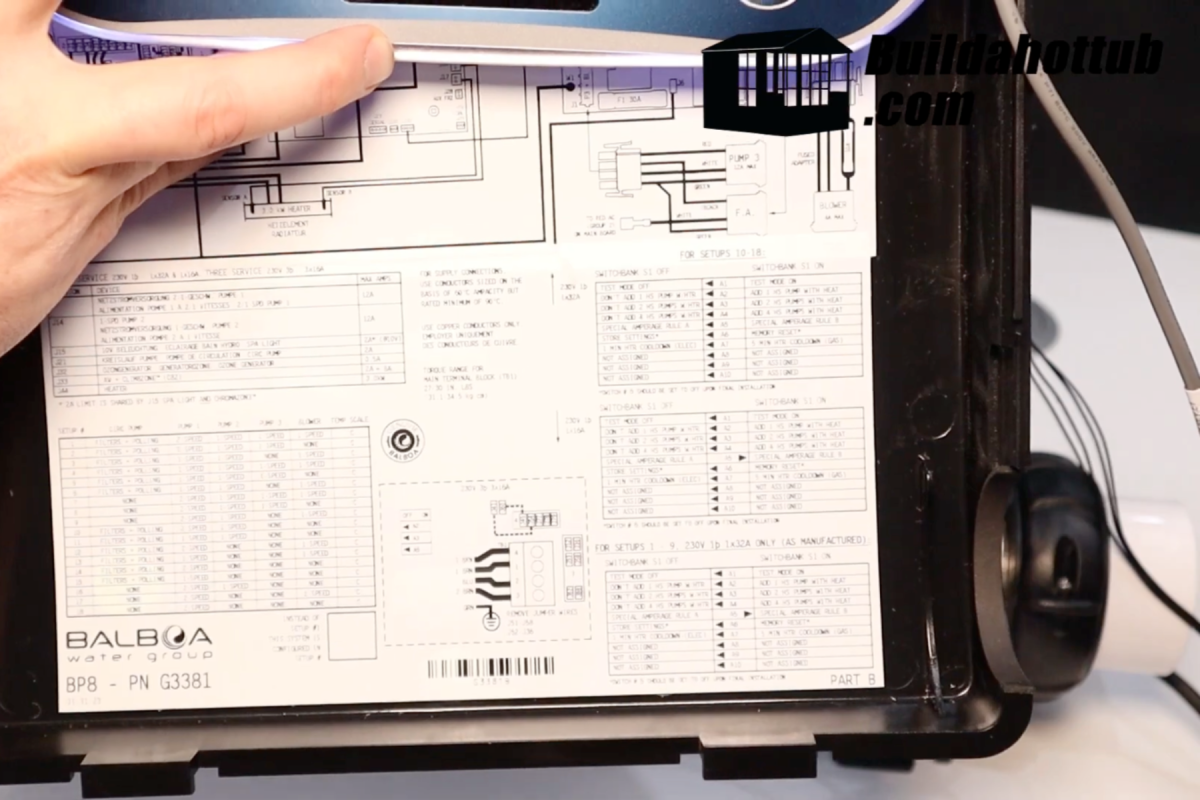
This unit can be set up for lots of combinations of pumps and blowers. In the bottom right corner of the BP8 cover there’s a table listing 18 different configurations. A new pack starts in mode 1 by default. For this demo I’m setting it to Mode 9, which is designed for:
- A two-speed pump (Pump 1)
- A single-speed pump (Pump 2)
- A single-speed blower
So the first step is to identify what you’re connecting to the pack. For a tour of the board itself, see the spa pack guide, and for wiring see hot tub wiring explained.
Getting started
To program the BP8, I’ve connected it to a TP700 topside, which has a graphical interface. It’s the same interface as on the spaTouch range. If you’re not sure the TP700 is right for your pack, see which Balboa topside control do I need and my TP700 review.
Step 1: Enable Test Mode
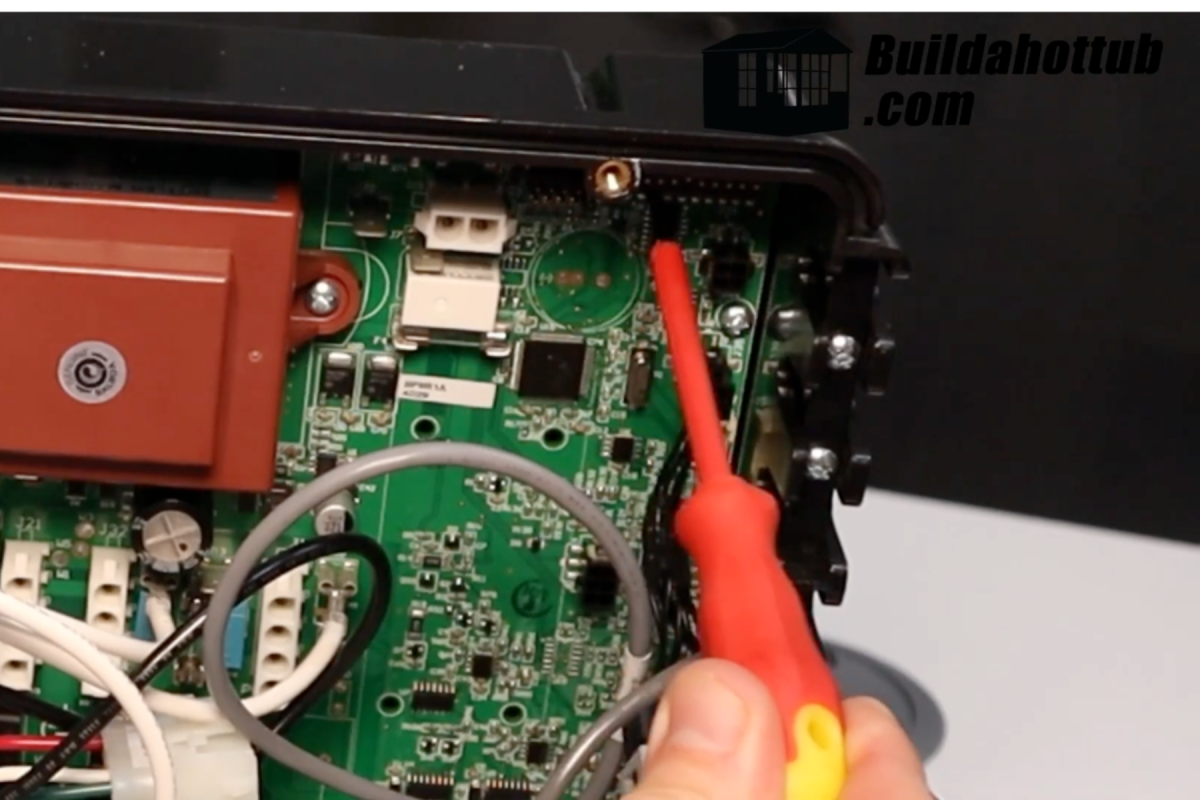
- Find the bank of 10 dip switches in the top right corner of the BP8.
- Carefully flip dip switch 1 to ON (upwards).
- Safety note: the unit is live, so touch only the switch and avoid other components.
This turns on Test Mode (setup mode), which unlocks extra settings on the graphical interface.
Step 2: Change the setup mode
Once in Test Mode, navigate the menus:
- Select the Test menu. It only appears when dip switch 1 is ON.
- You’ll see the current setup mode. For this demo it’s Mode 1, the default.
- Scroll down and choose Mode 9 from the list (or the mode that matches your equipment on the table on the cover).
- Press Set to confirm.
You’ll hear the relays click and the unit resets by itself. The screen shows “Initializing” while the new settings take effect.
Step 3: Finish the configuration
When the unit restarts, you may see an error code or a prompt to set the time. That’s normal, especially on a demo unit like mine.
- Go back to the Test menu and check the mode now shows Mode 9.
- Make sure it matches the equipment you’ve connected.
Once you’re happy:
- Carefully go back to the dip switches.
- Flip dip switch 1 back OFF (downwards).
- Confirm the Test option has disappeared from the menu.
Common mistakes
- Choosing a mode that doesn’t match the pumps and blower actually wired to the pack.
- Leaving dip switch 1 ON, which leaves the pack in Test Mode.
- Plugging in or swapping a topside with the power on. Always isolate first.
- Forgetting to check the wiring. If a pump doesn’t run after the change, check the outputs on the circuit diagram, and see how to read a spa pack wiring diagram.
Wrapping up
That’s it. You’ve configured the Balboa BP8 with a TP700. The relays click as it moves to the new mode, and you’re ready to go. If you’re deciding between a new pack and a new board, see replace the spa pack or just the circuit board, and to understand the heat settings once it’s running, see Balboa heat modes explained.
If you need help understanding or setting up a BP8, let me know. Parts are available on parts4tubs.co.uk (UK) and parts4tubs.com (USA).
FAQs
How do I put a Balboa BP8 into setup mode?
Flip dip switch 1 to ON. On a TP700 or spaTouch a Test menu then appears where you can change the setup mode.
What setup mode do I need on a BP8?
It depends on the pumps and blower you have. The table on the cover lists the 18 modes. Mode 9 is a two-speed pump 1, a single-speed pump 2 and a single-speed blower.
Why does my BP8 show an error after changing the mode?
A restart error or a request to set the time can be normal right after a change. If an error stays, check the wiring against the mode you chose.
Is the process the same with a TP600?
It is slightly different from the TP700, which has the graphical interface. Check the manual for your topside.
Do I need to turn dip switch 1 off afterwards?
Yes. Flip it back OFF and confirm the Test menu has disappeared, so the pack is not left in Test Mode.
Got a question about your own setup? Drop it in the comments below. I read them all.
Cheers,
Andi
You can also find me on my socials;






looking for hot tub & pool parts?
I have everything you need....
If you are looking for Hot Tub & Swimming Pool Parts, either for your DIY Hot Tub, plunge pool or swim spa build, or you are looking for parts to repair your pool or hot tub - then check out my USA & UK stores below.
I carry 30K+ product lines across the stores

Can I Help You?
If I can help you in any way I would love to hear from you. You can get in touch using the form below.
Thanks - Andi
 Hi, Andi here. I own Buildahottub.com and also write all of the articles and info pages on the site. Some years back now, I built my own hot tub but struggled to find the information I needed. So, once my tub was complete, I started this website to help others in their own pursuit of hot tub and plunge pools DIY building information.
Fast forward to 2025, I've helped over 1400+ DIY customers just like you all over the world build hot tubs and pools. Have a good look around the site, there are lots of resources here. Please do get in touch if I can help you. - Cheers, Andi
Hot Tub Seats, Benches and Loungers: How to Build Them Comfortable
Hot tub seats are what you touch every time you get in. Here are the [...]
Nov
The 8ft x 8ft Hot Tub: Why It’s the Most Popular DIY Size
The 8x8 hot tub is the size I sell more plans for than any other. [...]
Nov
How Big Should Your Hot Tub Be? Sizes, Seating and Water Volume Explained
How big should your hot tub be? A practical guide to hot tub sizes for [...]
Nov
Infinity Hot Tub Cost: What the Overflow Edge Really Adds
What does an infinity edge really add to a DIY hot tub? A 2026 breakdown [...]
Oct
Swim Spa Sizes: How Long and Deep Does a DIY Swim Spa Need to Be?
How big should a DIY swim spa be? The minimum length for a swim jet, [...]
Oct
Hexagon, Round or Rectangle? Choosing a Shape for Your DIY Hot Tub
Square, round, hexagon or octagon? How each hot tub shape affects seating, water volume, the [...]
Oct
Stock Tank Sizes: Which Tank Makes the Best Hot Tub or Plunge Pool?
Stock tank sizes explained: 6ft, 8ft and 10ft round, oval and poly tanks, how much [...]
Oct
Cocktail Pool Cost in 2026: What a DIY Build Really Costs
What does a cocktail pool really cost to build yourself in 2026? A line-by-line budget [...]
Oct